904 Real Estate Photography
904 Snapshot: Your Free Jacksonville Property Website: A Quick How-To

Welcome to the 904 Snapshot, our weekly deep dive into making your Jacksonville listings impossible to ignore.
Hey everyone! Shawn Jolly here from 904 Real Estate Photography. If you’ve worked with me before, you know I’m all about making your life easier. Between running to listing appointments in Riverside and managing open houses in Nocatee, I know Jacksonville realtors are some of the hardest-working people in the business.
One thing I’ve noticed is that while everyone loves getting their professional photos back, not everyone is taking full advantage of the free property website and media delivery system that comes with every single shoot. Yes, you read that right: it’s totally free. I don't believe in nickel-and-diming my partners. If you book a shoot, you get a high-end digital headquarters for that listing.
Because I know you’re busy, I put together this quick "cheat sheet" to help you navigate your delivery link like a pro. Consider this your go-to guide for everything from MLS compliance to social media magic.
Why Use the Property Website?
In the competitive Jacksonville real estate photography market, standing out is everything. When you send a link to a beautiful, dedicated website for a home, it shows your sellers that you are going the extra mile. It’s not just a folder of images; it’s a marketing experience.
Every time I deliver a project, you’ll receive an email with a link to your Media Delivery Page. Think of this as your control center. From here, you can download photos, grab links for the MLS, and view your property website.
Branded vs. Unbranded Links: The MLS Compliance Talk
This is probably the most important part of the whole system, and it’s the question I get asked most often. To keep the Northeast Florida Association of Realtors (NEFAR) and the MLS happy, you have to follow specific rules about what information is displayed on your virtual tours and websites.
The Unbranded Link (For the MLS)
The Unbranded Link is your best friend when it comes to the MLS. This version of the property website contains all the high-quality media: photos, video, 3D tours: but it has absolutely no contact information for you or your brokerage. This is essential to stay compliant with MLS rules that prohibit agent branding on public-facing virtual tour links.
The Branded Link (For Everything Else!)
The Branded Link is where you get to shine. This version includes your headshot, your phone number, your email, and your brokerage's logo. This is the link you want to:
- Share on your Facebook and Instagram business pages.
- Email directly to your sellers so they can brag to their friends.
- Text to potential buyers who inquire about the property.
- Include in your email signature for the week the listing goes live.
Using the right link at the right time ensures you stay professional and compliant while still getting the credit you deserve for a great listing. You can find both of these links clearly labeled on your delivery page.
Downloading the Right Photo Sizes
I provide multiple sizes for every photo because I know a file that looks great on a giant office monitor might be too big for the MLS to handle, or not formatted correctly for Airbnb. Here is the breakdown of what you’ll find:
- MLS Size: These are optimized for fast loading and meet the specific file size requirements for the MLS. Use these for your listing upload to ensure they don't get compressed or rejected.
- Full Size / Print: These are high-resolution files. If you are making high-end brochures, flyers, or even a billboard on I-95, these are the ones you want. They are large files, so don't try to upload these directly to the MLS!
- Airbnb/Rental Size: If you’re managing a short-term rental in Jax Beach, these are specifically scaled to look perfect on the Airbnb and VRBO platforms.

Sharing the Media Player and Slideshow
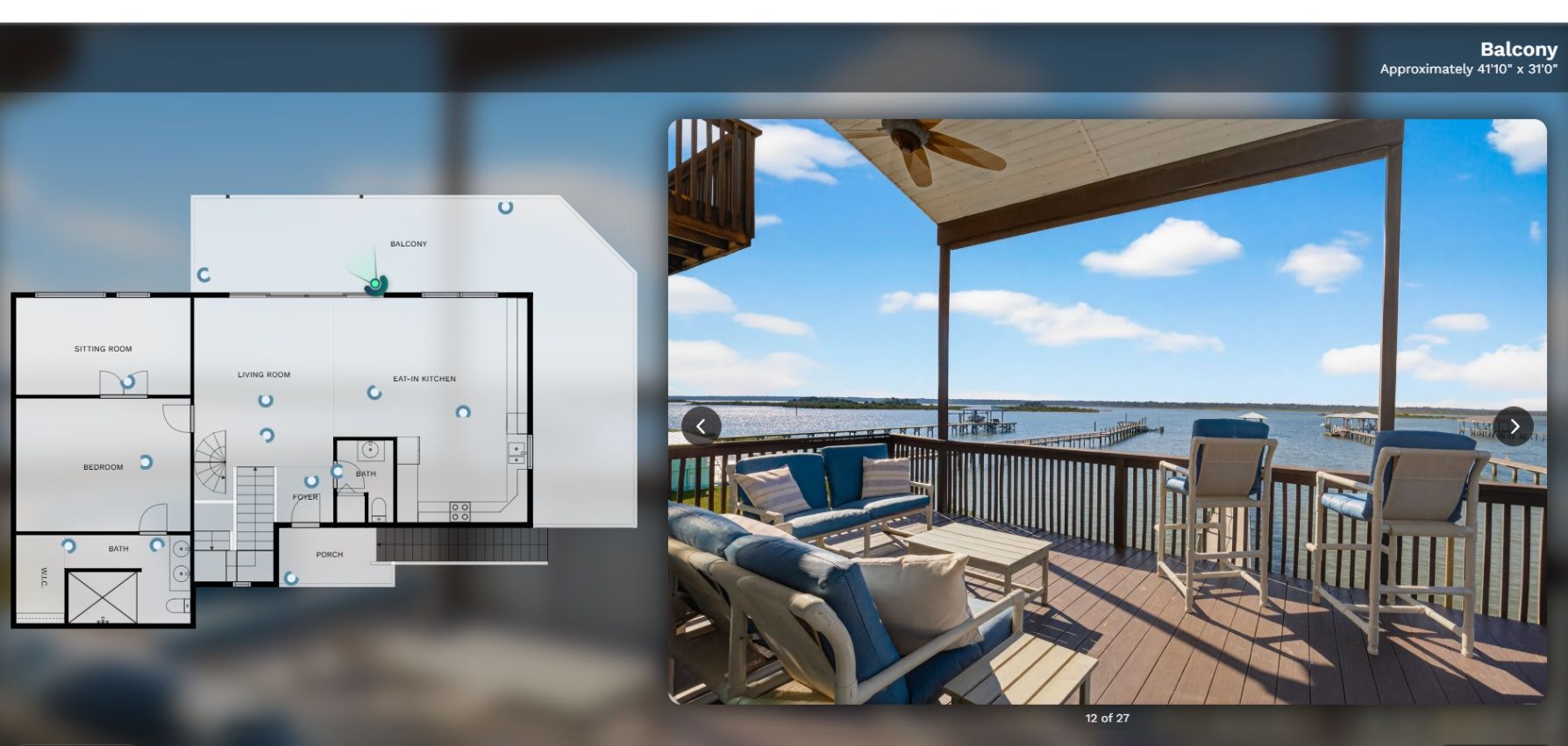
One of the coolest features of the free property website is the built-in media player. It creates a stunning slideshow of your photos and videos automatically.
Instead of just posting a single photo to social media, try sharing the link to the property website itself. When a potential buyer clicks that link, they are immersed in a full-screen experience of the home. It’s much more impactful than a standard gallery. If you want to see how these look in action, check out some of our sample tours.
The "Tech Corner": Unzipping Your Files
I get it: tech can be a headache when you’re just trying to get a listing live before 5:00 PM on a Friday. When you download your photos from the delivery page, they usually come in a ".zip" file. This is just a way to bundle a bunch of big files into one package for faster downloading.
You cannot upload a zip file directly to the MLS; you have to "unzip" or "extract" them first. Here is the 10-second guide:
- For Windows Users: Find the downloaded file, right-click on it, and select "Extract All." A new folder will appear with all your individual photos ready to go.
- For Mac Users: It’s even easier. Just double-click the zip file, and your Mac will automatically create a folder with your images.
If you ever get stuck, I have a more detailed breakdown on the FAQ page.
Don't Wait Too Long: The One-Year Rule
While I’d love to host these sites forever, I have to keep the servers running smoothly for all the new listings coming in. Your property website and media delivery link will stay active for one full year from the date of the shoot.
This is usually plenty of time for even the trickiest listings to find a buyer. However, I always recommend that you download and save your photos to your own computer or cloud storage as soon as you get them. That way, if you need to relist the property down the road or use the photos for your personal portfolio, you have them safe and sound.
Local Jacksonville Love
Whether you are listing a historic bungalow in Avondale or a sprawling estate in Queen’s Harbour, these property websites are designed to highlight the unique vibe of Jacksonville real estate. We live in a beautiful city, and our goal at 904 Real Estate Photography is to make sure your listings look just as good online as they do in person.
By using these free tools, you aren't just getting photos: you're getting a complete digital marketing suite. It saves you time, makes you look incredibly professional to your clients, and ultimately helps sell homes faster.

Summary & Key Takeaways for Realtors
To wrap things up, here is your quick checklist for using your free property website:
- Check your email: Look for the link to your "Media Delivery Page" after every shoot.
- Use the Unbranded Link for MLS: Keep NEFAR happy and stay compliant.
- Use the Branded Link for Social Media: Get your name and face out there!
- Download the "MLS Size" for listing: It saves you the headache of upload errors.
- Extract your files: Remember to "Extract All" on Windows or double-click on Mac.
- Download everything early: You have one year before the link expires.
If you have any questions about how to use these features, or if you're ready to book your next shoot and see these websites in action, head over to my contact page. I'm always happy to help a fellow Jacksonville pro level up their listing game!
Let’s get those listings sold!
( Shawn Jolly
Owner, 904 Real Estate Photography)